
For accounting and bookkeeping firms
Every client's bills, one screen.
Each client gets a folder with its own inbox, email address and rules. Open the folder list in the morning and you know where the day's work is.
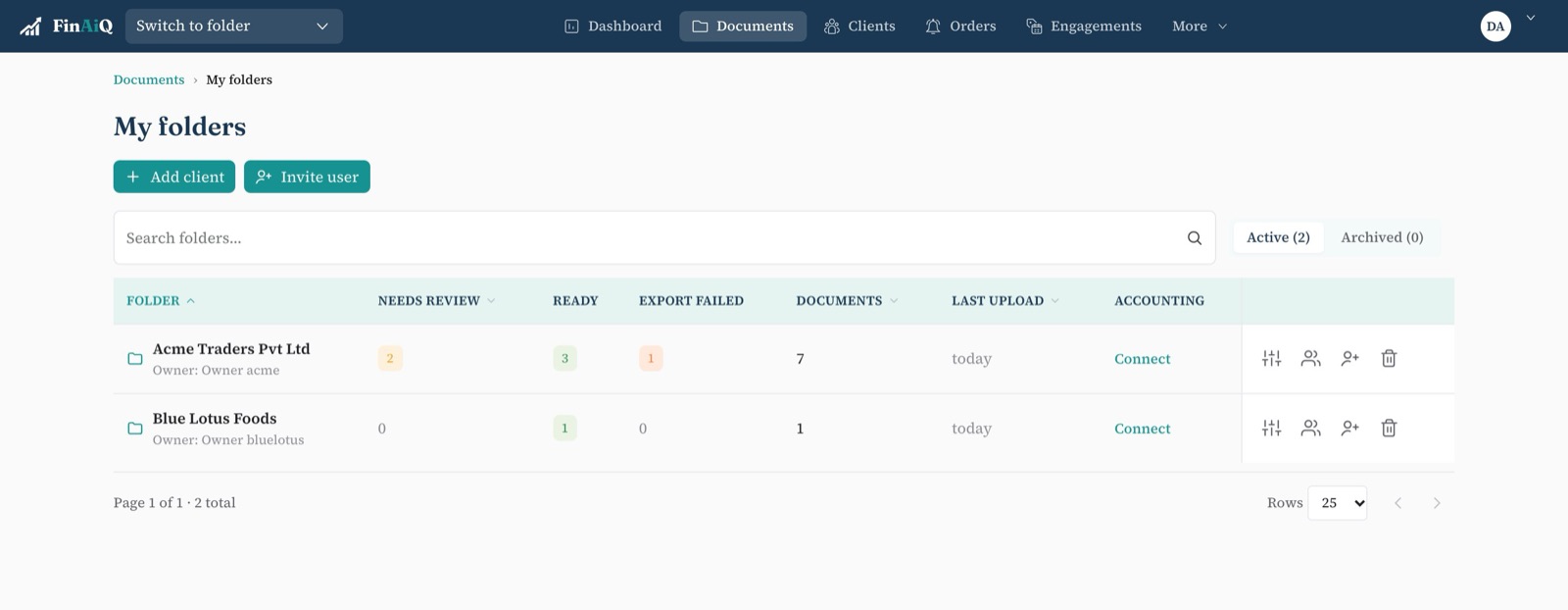
Built around clients, not documents
A folder per client
Bills, sales invoices and bank statements kept apart, with their own export target.
What's waiting, at a glance
The folder list shows how many documents are ready, need review or failed to export.
Staff see their clients
Invite people to the folders they work on. Nobody sees a client they shouldn't.
Rules per client
Trusted senders, default account and duplicate checks are set once for each folder.
Clients just send it
No portal logins to manage. They email, WhatsApp or snap bills with the app.
An answer when asked
The audit trail records every upload, edit, export and deletion.
A month-end, with FinAiQ
- 01
Bills arrive through the month
Clients and suppliers email them in or send them on WhatsApp; trusted email senders go straight through.
- 02
Review the exceptions
Open the clients with something in Needs review and clear it.
- 03
Export by client
Select the ready bills and send them to that client's Xero or QuickBooks file.
- 04
Fix what bounced
Anything rejected sits in Export failed with the reason.
Questions
- Can each client export to a different accounting file?
- Yes. Each folder connects to its own accounting software and file.
- Can I limit which staff see which clients?
- Yes. People only see the folders they've been invited to.
Bring a few clients across.
Set up folders for two or three clients and run one month through FinAiQ.